| .github | ||
| gradle/wrapper | ||
| src/main | ||
| update | ||
| versions | ||
| wrapper | ||
| .gitignore | ||
| build.gradle | ||
| CHANGELOG.md | ||
| common.gradle | ||
| gradle.properties | ||
| gradlew | ||
| gradlew.bat | ||
| LICENSE | ||
| README.md | ||
| README_CN.md | ||
| settings.gradle | ||


MCDiscordChat






MCDiscordChat (MCDC), a practical and powerful Fabric and Quilt Minecraft <> Discord chat bridge inspired by BRForgers/DisFabric
More information + Docs: MCDiscordChat Docs | Xujiayao's Blog
⚠️ Reminder
MCDiscordChat Will NOT provide an option to turn off auto-checking for updates, as it is good practice to stay up to date, especially for a mod like MCDC, which is unstable and has frequent bug fixes.
If you insist that you do not want to update, then I believe you have the ability to maintain MCDC frequently and fix bugs yourself. Please fork the repository to delete the code of check for updates. However, Do NOT submit Pull Requests for that change :)
Note that the good changes in the forks may be added to the upstream repository via Pull Requests without notice.
For more details, check out #52 (comment). Thank you.
Introduction
MCDiscordChat (abbreviated as MCDC), a practical and powerful Fabric and Quilt Minecraft <> Discord chat bridge inspired by BRForgers/DisFabric.

Download
All releases can be downloaded at the following sites:
You can find the latest build JAR files at GitHub Actions.
Support
If there is a bug or suggestion, or something you don't understand, you can submit an issue on GitHub.
Features
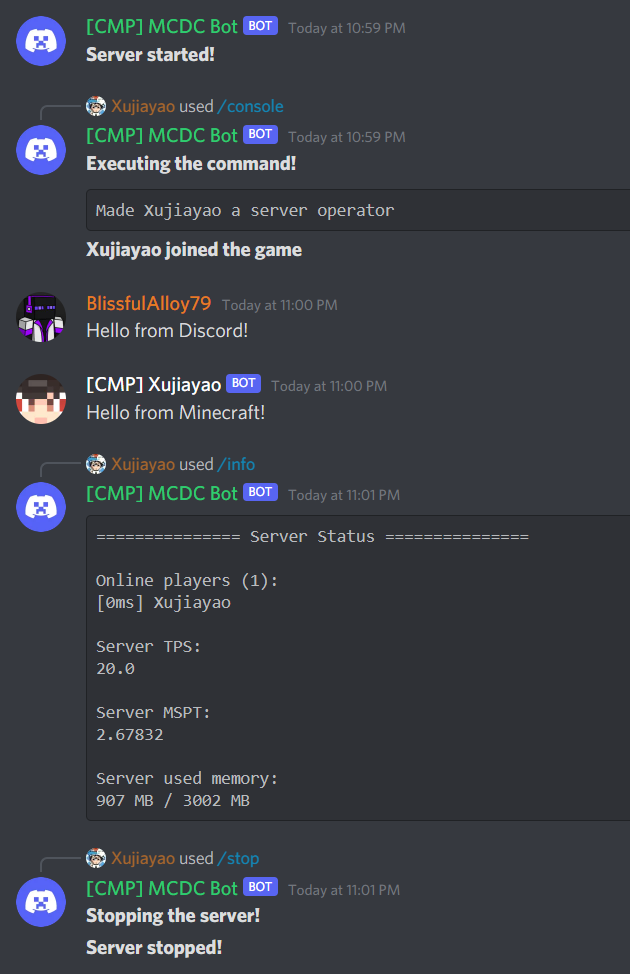
- Support multi-server mode (multi-server operation on the same Discord channel)
- Support multiple languages (English / Chinese)
- Support displaying server status using Discord channel topic feature
- Minecraft <> Discord cross server chat
- Support Discord Webhook feature
- Customizable Webhook Avatar API
- Use the bot itself to send chat messages when Webhook URL is not filled
- Support in-game Markdown parsing
- Support highlighting and using default Unicode and server custom emoji in-game
- Support highlighting stickers in-game
- Support highlighting and mentions (@) in-game
- Support disabling mentions (@) in-game
- Support highlighting and opening hyperlinks and GIFs in-game
- Support disabling all parsing
- Support in-game display of Discord user role colour
- Support in-game display of response messages
- Broadcast player command execution
- Players who execute commands can also see the commands themselves
- Exclude broadcasts for execution of specific commands
- Send all console log messages to Discord
- Support Discord Webhook feature
- Server Commands available
- Use Discord to manage channels that can execute MCDC commands
- Notify in-game players when someone executes an MCDC command
- Normal Commands
- /info | Query server running status
- /help | Get a list of available commands
- /update | Check for update
- /stats <type> <name> | Query the scoreboard of a statistic
- Admin Commands
- /reload | Reload MCDiscordChat config file (admin only)
- /console <command> | Execute a command in the server console (admin only)
- /log | Get the specified server log (admin only)
- /stop | Stop the server (admin only)
- Fully customizable message format
- Sending specific server messages to Discord can be disabled
- In-game
- Chat messages from Discord
- Response messages from Discord
- Messages from other servers
- Discord
- Server started
- Server stopped
- Player joined server
- Player left server
- Player reached a progress / achieved a goal / completed a challenge
- Player died
- Server MSPT is higher than a certain value
- Use admin list to configure user permissions to use special commands
- Support Hot Reloading of the config file
- Backup every time the config file is loaded
- Check for updates regularly
- Customizable update notification channel